
COPAK PRODUCT SUPPORT
VOX Pro Resources & Support
Get started with your VOX Pro Cable or Universal charger. Find app setup guidance, understand its charging features and contact COPAK for help.
IDENTIFY YOUR CHARGER
Cable or Universal?
Use the model shown on your product label when requesting technical help or documents.
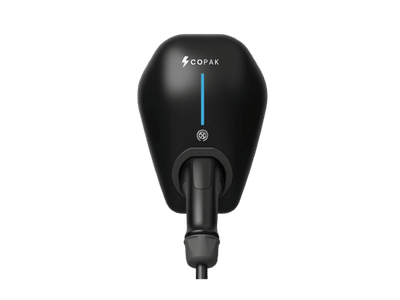
VOX Pro Cable
A Type-2 charger with a permanently attached 5m cable. Longer attached cables, up to 10m, are available on request at additional cost.
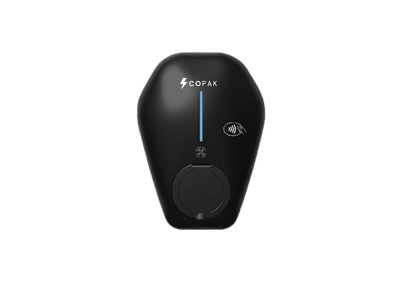
VOX Pro Universal
MODEL VOX Pro Universal
A Type-2 socket charger used with a separate compatible cable. Choose the cable to suit your vehicle and parking space.
GET CONNECTED
Set Up Monta Charge
For a VOX Pro charger configured with Monta, use Monta Charge to access your charger and review charging sessions. COPAK can confirm the platform and access arrangements for your installation.
Install & Sign In
Download Monta Charge and create your account or sign in to your existing account.
Request Charger Access
Ask COPAK or your property’s charging administrator for an invitation or the correct join code.
Join Your Account
In Monta Charge, open Me → Accounts and use the join option. Enter the supplied code and wait for administrator approval. If invited directly, accept the invitation in Notifications.
Find Your Charger
Once access is approved, find your assigned charger and follow the app’s charging instructions. Contact COPAK if the charger is not visible.
Account access is managed by the installation’s administrator. Read Monta’s account-access guide.
SMART CHARGING
Understand Your VOX Pro
Charging behaviour depends on your vehicle, electrical supply and the configuration completed for your installation.
Built-in Dynamic Load Management
DLM adjusts charging to the available electrical capacity. It is built into VOX Pro and requires compatible monitoring accessories and configuration. COPAK can set it up for homes with limited spare load.
Connected Charging & Records
VOX Pro supports Wi-Fi, Ethernet and compatible charging platforms through OCPP. Connected app features include charging-session information and energy-use records. Remote support depends on the charger being connected.
QUICK REFERENCE
Key Details at a Glance
Actual charging power is limited by the vehicle’s onboard charger, cable rating and available electrical supply.
Swipe the table horizontally on smaller screens.
| Feature | VOX Pro Cable | VOX Pro Universal |
|---|---|---|
| Model | VOX Pro Cable | VOX Pro Universal |
| Charging connection | Attached Type-2 cable | Type-2 socket |
| Charging cable | 5m standard; up to 10m on request at extra cost | Separate compatible cable required |
| Maximum AC output | Up to 22kW, three-phase | Up to 22kW, three-phase |
| Rated input current (max) | 32A per phase; 32A single-phase | 32A per phase; 32A single-phase |
| Dynamic Load Management | Built in; accessories and configuration required | Built in; accessories and configuration required |
| Connectivity | Wi-Fi and Ethernet; optional 4G | Wi-Fi and Ethernet; optional 4G |
| RFID access | Optional | Optional |
| Product warranty | 36 months from invoice date | 36 months from invoice date |
COMMON QUESTIONS
Help With Everyday Charging
Why can’t I see my charger in Monta Charge?
Check that you are signed into the account used for the invitation and that your access request has been approved. Send COPAK the charger model and a screenshot if it is still missing.
My charger appears offline. What should I send COPAK?
Tell us when the charger last appeared online and whether your router, Wi-Fi name or internet service recently changed. Include a screenshot of the app message and a photo of the charger’s status indicator.
Why is charging below 22kW?
22kW is the maximum three-phase AC output. Your actual rate depends on the vehicle’s onboard charger, cable rating, electrical supply and charger configuration. When configured, DLM can reduce charging power to stay within the available load.
Is Dynamic Load Management optional?
The DLM capability is built into VOX Pro. Implementation requires compatible monitoring accessories and configuration. Contact COPAK to check the setup for your home.
Can I use RFID or plug-to-start?
VOX Pro supports app, physical-button and plug-to-start control, with RFID available as an option. COPAK can confirm the access method enabled for your charger and installation.
How do I request technical or warranty support?
Email support@copak-technical.com with your contact details, charger model and a description of the issue. Include your invoice for a warranty claim, plus useful photos or screenshots. Never send account passwords or one-time verification codes.
TALK TO COPAK
Support for Your VOX Pro
Share your charger model, the issue you are experiencing and any message shown in the app. Our team can review the information and help you with the next step.
- 01Model and contact details
- 02Photos or app screenshots
- 03Invoice for warranty enquiries